Large language Models (LLMs) are incredibly capable, but they have one major limitation: they are stateless. Each request is handled in isolation, so unless past interactions are included again in the prompt, the model has no built-in memory beyond its current context window.
That creates real problems for applications that need continuity or personalisation. Over time, assistants can forget user preferences, earlier decisions, or ongoing tasks, which leads to conversational amnesia, higher token costs, and a weaker overall user experience.
To solve this, modern LLM applications add an external memory layer around the model. This usually combines short-term conversational context, long-term storage such as vector databases, and retrieval techniques like RAG to bring the most relevant past information back into each new interaction. Research and practical system design both point to a hybrid approach, where episodic memory (short-term) captures detailed events and semantic memory stores higher-level user understanding for stronger personalization.
Lamatic.ai offers a practical, low-code way to implement this pattern through three core building blocks: Memory Store, Memory Add Node, and Memory Retrieve Node. Together, these components help developers create production-ready, memory-augmented agents without having to build the entire memory infrastructure from scratch.
Why Stateless LLMs Struggle with Long-Term Interaction
Context Windows and Stateless Design
Most LLMs operate within a fixed context window, which means they can only process a limited number of tokens at inference time. Within that window, the model predicts the next token based on patterns learned during pretraining, but it does not retain persistent state across separate requests.
From a systems perspective, this makes LLMs stateless functions: every API call is independent, and any form of memory must be explicitly included in the prompt. If part of a conversation or workflow falls outside the context window, or is not sent again in the next request, the model effectively forgets it.
This design makes systems easier to scale and deploy, but it does not match how people naturally expect assistants to behave. Users assume that an AI which remembers their name, preferences, and past decisions will continue to remember those details over time.
Conversational Amnesia in Real Applications
In production chatbots and AI agents, this statelessness often shows up as conversational amnesia. The system may repeatedly ask for the same information, lose track of long-running goals, or fail to reference decisions made days or even weeks earlier.
A common workaround is to append the entire chat history to every prompt. But as conversations grow, that approach quickly becomes impractical.

Three major problems usually appear:
Context overflow: Once the token limit is reached, older messages must be dropped or compressed, which can remove information that is still relevant.
Cost and latency: Re-sending large conversation histories increases token usage, slows response times, and raises inference costs.
Noise: Long, unfiltered histories often contain irrelevant, redundant, or contradictory details that can confuse the model.
A bigger context window alone is not enough. To support reliable long-term interaction, LLM-based systems need dedicated memory mechanisms.
What “Memory” Means in LLM Systems
In LLM systems, memory usually means information stored outside the model’s weights so the system can retain useful context without retraining the model. This matters because LLMs are stateless by default, which means they do not naturally remember past interactions unless that information is added back into the system.
At a high level, memory in these systems usually works across two time horizons:
Short-term memory holds the recent conversation, working context, and intermediate steps inside the active context window or a bounded buffer.
Long-term memory stores information across sessions in external systems such as databases or vector stores, so it can be retrieved later when relevant.
Long-term memory is also not just one thing. In practice, it often includes two complementary forms:
Episodic memory keeps detailed records of specific interactions, such as chat transcripts, task runs, logs, timestamps, and metadata.
Semantic memory stores distilled knowledge extracted from those interactions, such as user preferences, recurring goals, stable traits, or inferred skills.
This split is useful because raw interaction history is often too large, noisy, or inefficient to inject directly into every prompt. Semantic memory gives the system a cleaner and faster way to personalize responses, while episodic memory remains the source of truth when exact recall is needed.
In most production-grade systems, the best setup is a hybrid approach. Episodic logs preserve the full record, while semantic summaries and profiles are derived from them for retrieval, prompt conditioning, and personalization at runtime.
That combination is what helps turn a stateless LLM into something that feels far more consistent, adaptive, and useful over time.
Memory architecture in practice
A robust LLM memory architecture usually contains more than just a model and a vector database. In production systems, memory works best as a pipeline with clearly separated responsibilities rather than a single retrieval step.

A common architecture includes the following layers:
Ingestion layer: Captures raw inputs such as user messages, tool outputs, decisions, summaries, or structured facts.
Memory processing layer: Cleans, chunks, tags, summarizes, and classifies information before storage so the system does not retain every raw interaction indiscriminately.
Storage layer: Persists memory in one or more backends, such as a vector store for semantic retrieval, a document store for raw logs, and a structured database for stable user attributes.
Retrieval layer: Fetches relevant memory using similarity search, metadata filters, recency rules, and ranking logic.
Context assembly layer: Combines the retrieved memory with the live user query, system instructions, and short-term conversation context before sending the final prompt to the LLM.
Write-back layer: Decides what new information is worth storing after the model responds, helping the system continuously improve its future recall.
This layered design matters because memory quality is rarely determined by embeddings alone. The real gains usually come from deciding what to store, how to represent it, when to retrieve it, and which memories deserve to be promoted into long-term storage.
Design patterns for long-term memory
Industry systems and research prototypes have converged on several recurring design patterns for long-term memory in LLM-powered applications:
Conversation buffer or sliding window: Keep only the most recent NN messages in context as short-term memory. This is simple and useful for local coherence, but it does not provide true long-term recall once older messages fall out of the window.
Raw vector memory store: Store important messages or facts as embeddings in a single index and retrieve them by similarity. This is the most straightforward long-term memory pattern and maps directly onto a classic RAG setup.
Dual memory: episodic + semantic: Maintain one store for detailed event logs and another for distilled summaries, traits, or user profiles. At retrieval time, the system can pull both stable background knowledge and specific past episodes.
Profile + episodic log: Keep a compact, always-relevant user profile for fast personalization, while preserving a deeper event history for situations that require detailed recall. This is often more efficient than searching every raw conversation turn.
OS-style virtual context: Systems such as MemGPT or Letta treat the context window like fast memory and external storage like slower backing memory, with explicit policies for paging information in and out. This pattern is useful when the agent must reason over far more information than can fit into the active prompt at once.
These patterns are not mutually exclusive. In practice, strong systems are usually hybrid: a short-term conversational buffer supports immediate coherence, a semantic store supports recall, and a profile layer supports personalization.
Why naive memory fails
A common mistake is to treat memory as “dump everything into a vector database and retrieve top-k”. That approach sounds simple, but it often produces noisy, weak, or misleading recall because not every message deserves to become durable memory.
Effective memory systems need clear schemas and retrieval policies, such as:
Storing different memory types separately, for example preferences, project state, task history, and general knowledge.
Attaching metadata like timestamps, source, confidence, user ID, session ID, and topic.
Using ranking strategies that combine semantic similarity with recency and relevance.
Applying summarization or consolidation so repetitive conversations do not flood the index with near-duplicate entries.
Defining rules for overwriting, decaying, or deleting stale memories over time.
Good memory architecture is less about storing more and more about storing the right things in the right form.
Common pitfalls
Three challenges repeatedly appear when teams move from a demo to a real memory-enabled system:
Noisy or irrelevant retrieval: The system may retrieve memories that are semantically close but contextually wrong, which confuses the model and lowers answer quality.
Staleness and drift: User preferences, project status, and even factual assumptions change over time, so memories need update, replacement, and expiration strategies.
Privacy and governance: Persistent memory introduces responsibilities around consent, retention limits, deletion workflows, and auditability, especially when user data is sensitive or regulated.
Addressing these issues requires both technical controls and organizational discipline. On the technical side, teams need filters, decay functions, summarization, ranking, and memory management policies; on the organizational side, they need governance, retention rules, and user-facing controls over what is stored and forgotten.
Lamatic’s Memory Model: Three Core Components

Lamatic provides a low‑code environment for building LLM workflows using nodes that can be wired together visually. For memory, it offers three primary components that map closely to the architectural concepts above:
Memory Store: the persistent, managed memory collection.
Memory Add Node: the write path from workflows into the Memory Store.
Memory Retrieve Node: the read path that retrieves relevant memories for the current execution.
Together, these allow users to build persistent, personalised, and context‑aware agents without standing up separate vector databases or custom retrieval infrastructure.
1. Memory Store: persistent collections for users and sessions
The Memory Store in Lamatic is a managed context database built for long-term memory in workflows.
Key properties include:
Persistent memory collections: It stores contextual data tied to unique identifiers such as user IDs and session IDs, helping maintain continuity across interactions.
Scalability: It is designed to manage memory efficiently across multiple interactions without significant performance degradation.
Efficient retrieval: It uses optimized indexing to quickly return relevant contextual data when needed.
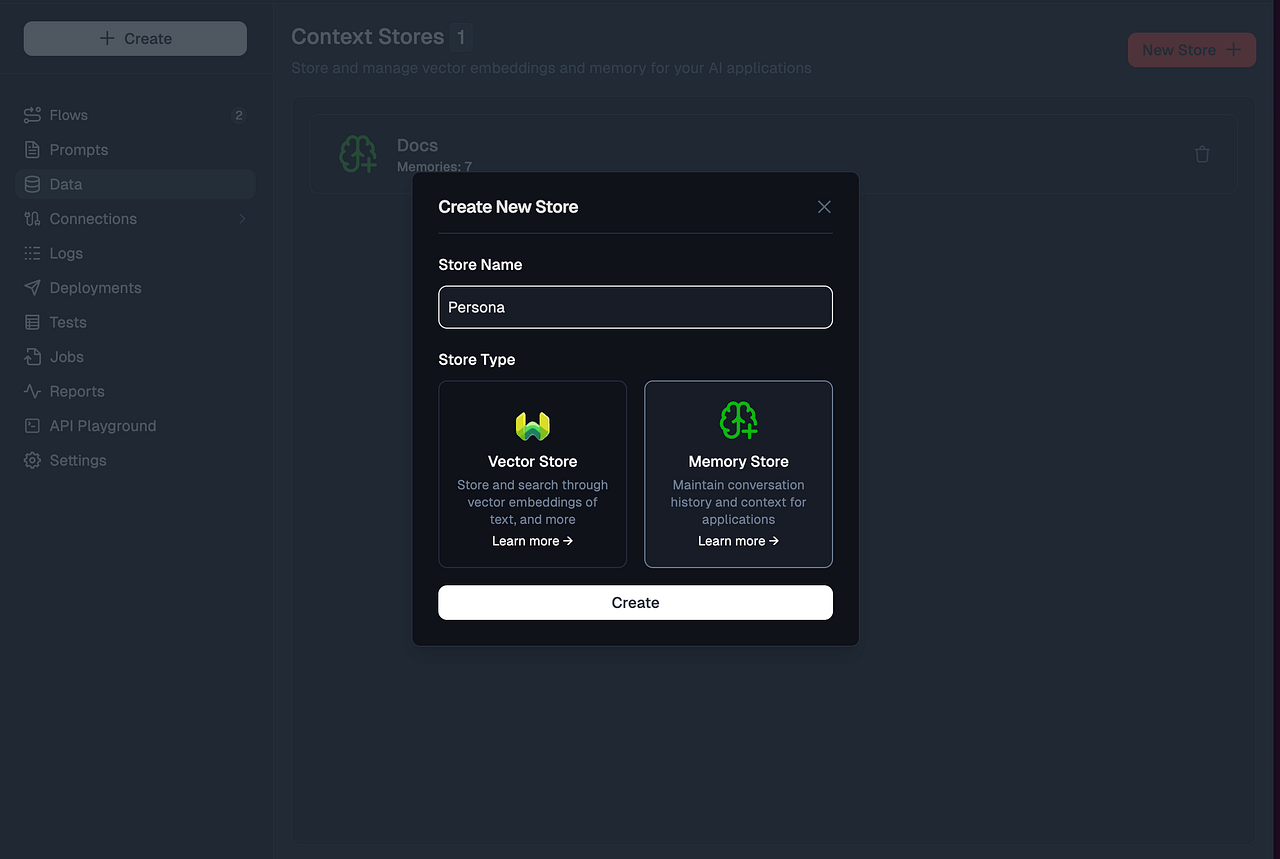
To create a Memory Store, a user can go to Context, selects Create New Memory Store, and defines the unique identifier used to associate memories with a user, session, or another entity.
Memory Add Node: writing memories from workflows
The Memory Add Node is Lamatic’s write‑side component for storing information in the Memory Store. It is an Action node that can be inserted anywhere in a workflow to persist context from that point onward.
Key capabilities include:
Persistent storage: Stores contextual information such as user preferences, conversation excerpts, decisions, or derived facts — so it can be reused in future runs.
User and session management: Supports both user‑level and session‑specific storage, controlled by fields such as
uniqueId(for user identity) and optionalsessionId.Metadata support: Allows arbitrary metadata (e.g., source, tags, timestamps, categories) to be attached, which can later be used as filters during retrieval.
A typical configuration flow is:
Insert a Memory Add Node into the Lamatic workflow graph after an LLM node or any transformation step.
Set the Unique Id to a user identifier (often from the trigger input, like
{{trigger.userId}}).Select or create the Memory Store / collection where the memory should be written.
Configure the embedding model and any generative settings if Lamatic is also summarizing or transforming the memory before storage.
Map the Memory Value field to the text or structured data that should be stored (for example, a short LLM‑generated summary of the conversation, or a JSON object with
"name": "Alex", "likes": "Python").Optionally set sessionId and metadata for finer‑grained control.
Deploy the project so new executions automatically write memories.
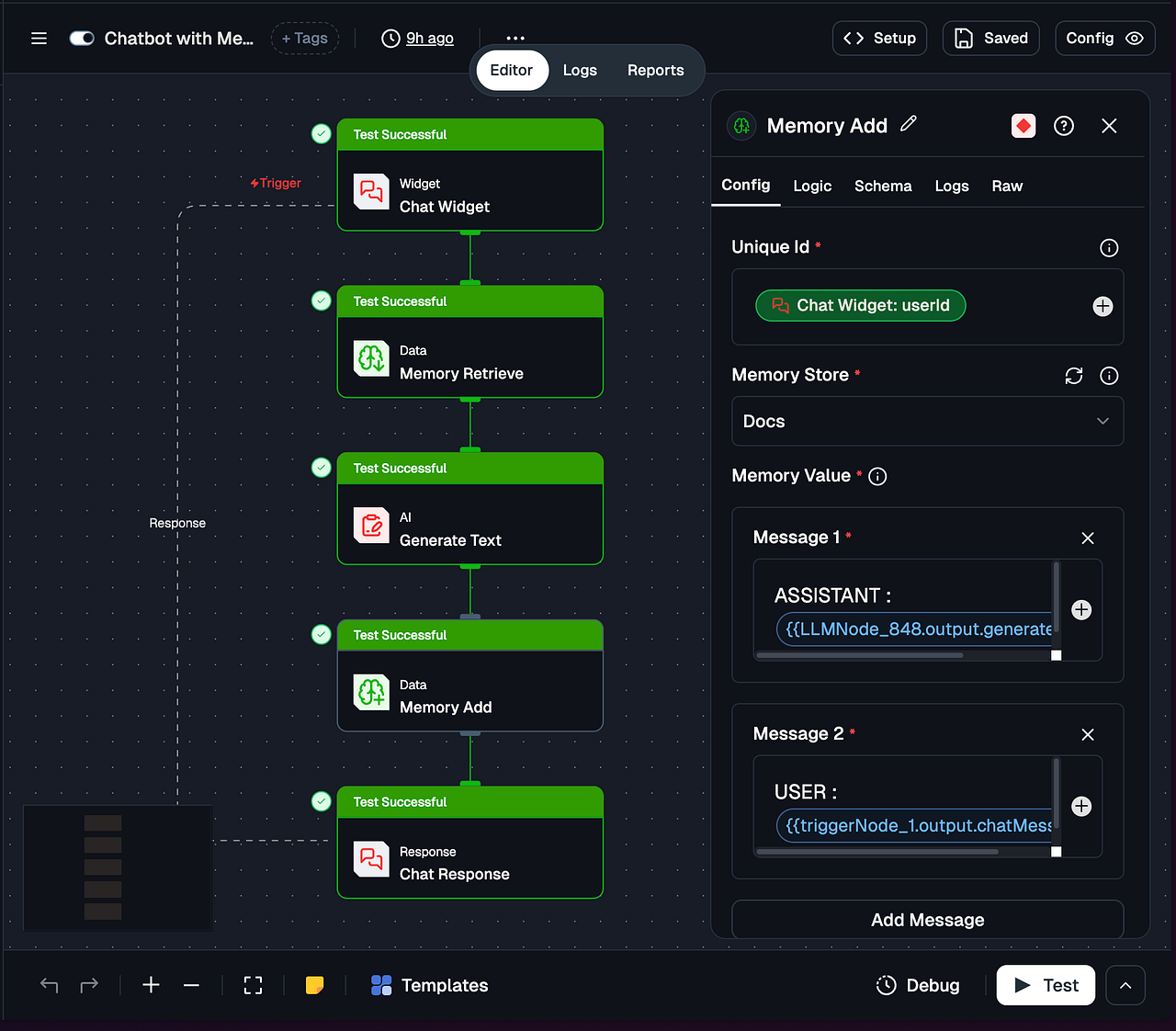
Since the node is part of the normal workflow graph, users can decide what to store (raw text, structured facts, summaries) and when to store it (e.g., only after certain conditions are met or after human approval).
Memory Retrieve Node: reading memories into workflows
The Memory Retrieve Node is the read‑side component that fetches stored memories from the Memory Store for use in the current execution. It is also an Action node and is typically placed before an LLM node so that retrieved memories can be injected into the prompt.
The Memory Retrieve Node supports several key functions:
Semantic memory search: Use a natural language Search Query to retrieve the most relevant memories based on vector similarity.
Filtering: Apply JSON‑based filters on fields such as
uniqueId,sessionId,metadata,timestamp, and even raw memory text to restrict results to a specific user or context.Configurable result limits: Control how many memories are returned (for example, the top 3 matches).
Dual output formats: Expose both processed
memories(clean objects ready to pass into AI nodes) andrawMemories(including full metadata and embeddings) for advanced scenarios.
A typical setup looks like this:
Insert a Memory Retrieve Node early in the workflow.
Set the Search Query to something derived from the user’s current message or task, such as
"What are the user's preferences?"or the message itself.Select the appropriate Memory Store / collection to search.
Configure the Embedding Model Name to match the model used for writing memories, ensuring vector dimensions are consistent.
Add Filters that pin retrieval to the correct
uniqueIdand optionallysessionId(e.g., only retrieve memories for the current user).Choose a Limit for the maximum number of memories to return (e.g., 3).
Connect the node’s
memoriesoutput to downstream AI nodes.

If retrieval fails or returns no results, check the same uniqueId and collection names are used across Add and Retrieve nodes, and verifying embedding configuration.
Building a Memory-Augmented Agent in Lamatic
With these three components, developers can implement a RAG-style memory architecture in Lamatic without writing backend code. A simple personalized agent can be built with just a few nodes.
High-Level Flow
A study assistant or preference-aware chatbot can follow this workflow:
Trigger Node (Chat Trigger) receives the user’s message and
userId.Memory Retrieve Node searches the Memory Store using the current message and returns the top-K relevant memories for that user.
LLM Node uses the message and retrieved memories to generate a personalized reply.
Memory Add Node stores a new memory, such as a summary of the latest interaction or an updated user preference.
Response Node (Chat Response) sends the final answer back to the user.
Example system prompt:
You are a helpful assistant. Use the following memories about the user, if relevant, to personalize your answer: {{memoryRetrieve.memories}}. Then answer the user’s question: {{trigger.message}}.
Copy the flow configuration below and paste it into the Flow Config section:
triggerNode:
  nodeId: triggerNode_1
  nodeType: chatTriggerNode
  nodeName: Chat Widget
  values:
    chat: ''
    domains: &ref_0
      - '*'
    chatConfig: &ref_1
      botName: Lamatic Bot
      imageUrl: >-
        https://img.freepik.com/premium-vector/robot-android-super-hero_111928-7.jpg?w=826
      position: right
      policyUrl: https://lamatic.ai/docs/legal/privacy-policy
      displayMode: popup
      placeholder: Compose your message
      suggestions:
        - What is lamatic?
        - How do I add data to my chatbot?
        - Explain this product to me
      errorMessage: Oops! Something went wrong. Please try again.
      hideBranding: false
      primaryColor: '#ef4444'
      headerBgColor: '#000000'
      greetingMessage: Hi, I am Lamatic Bot. Ask me anything about Lamatic
      headerTextColor: '#FFFFFF'
      showEmojiButton: true
      suggestionBgColor: '#f1f5f9'
      userMessageBgColor: '#FEF2F2'
      agentMessageBgColor: '#f1f5f9'
      suggestionTextColor: '#334155'
      userMessageTextColor: '#d12323'
      agentMessageTextColor: '#334155'
  modes: {}
  allConfigs:
    Config A:
      chat: ''
      domains: *ref_0
      nodeName: Chat Widget
      chatConfig: *ref_1
  schema: {}
nodes:
  - nodeId: memoryRetrieveNode_750
    nodeType: memoryRetrieveNode
    nodeName: Memory Retrieve
    values:
      limit: 10
      filters: |-
        {
          "operator": "And",
          "operands": [
            {
              "path": [
                "sessionId"
              ],
              "operator": "Equal",
              "valueText": "{{triggerNode_1.output.sessionId}}"
            }
          ]
        }
      searchQuery: What are the user's preferences?
      memoryCollection: Docs
      embeddingModelName: &ref_2
        type: embedder/text
        params: {}
        model_name: text-embedding-ada-002
        credentialId: 9135dfb3-3248-447f-a39e-955b22a7a81c
        provider_name: openai
        credential_name: LAMATIC_OPEN_AI
    modes: {}
    needs:
      - triggerNode_1
    allConfigs:
      Config A:
        id: memoryRetrieveNode_750
        limit: 10
        filters: |-
          {
            "operator": "And",
            "operands": [
              {
                "path": [
                  "sessionId"
                ],
                "operator": "Equal",
                "valueText": "{{triggerNode_1.output.sessionId}}"
              }
            ]
          }
        nodeName: Memory Retrieve
        searchQuery: What are the user's preferences?
        memoryCollection: Docs
        embeddingModelName: *ref_2
    schema:
      memories: object
      rawMemories: object
    logic: []
  - nodeId: LLMNode_848
    nodeType: LLMNode
    nodeName: Generate Text
    values:
      tools: &ref_3 []
      prompts: &ref_4
        - id: 187c2f4b-c23d-4545-abef-73dc897d6b7b
          role: system
          content: >-
            You are an personal AI assistant for the user. You are given the
            history of the user so make sure to go through that as it is a
            continuous chat session
        - id: 187c2f4b-c23d-4545-abef-73dc897d6b7d
          role: user
          content: |-
            Current Message : {{triggerNode_1.output.chatMessage}}

            Chat History : {{triggerNode_1.output.chatHistory}}
      memories: '{{memoryRetrieveNode_750.output.memories}}'
      messages: '{{triggerNode_1.output.chatHistory}}'
      attachments: ''
      credentials: ''
      generativeModelName: &ref_5
        - type: generator/text
          params: {}
          configName: configA
          model_name: gpt-4o-mini
          credentialId: 9135dfb3-3248-447f-a39e-955b22a7a81c
          provider_name: openai
          credential_name: LAMATIC_OPEN_AI
    modes: {}
    needs:
      - memoryRetrieveNode_750
    allConfigs:
      Config A:
        id: LLMNode_848
        tools: *ref_3
        prompts: *ref_4
        memories: '{{memoryRetrieveNode_750.output.memories}}'
        messages: '{{triggerNode_1.output.chatHistory}}'
        nodeName: Generate Text
        attachments: ''
        credentials: ''
        generativeModelName: *ref_5
    schema:
      generatedResponse: string
      _meta: object
      tool_calls: object
      images: array
  - nodeId: memoryNode_530
    nodeType: memoryNode
    nodeName: Memory Add
    values:
      uniqueId: '{{triggerNode_1.output.userId}}'
      sessionId: '{{triggerNode_1.output.sessionId}}'
      memoryValue: &ref_6
        - role: user
          content: 'ASSISTANT : {{LLMNode_848.output.generatedResponse}}'
        - role: user
          content: 'USER : {{triggerNode_1.output.chatMessage}}'
      memoryCollection: Docs
      embeddingModelName: &ref_7
        type: embedder/text
        params: {}
        model_name: text-embedding-ada-002
        credentialId: 9135dfb3-3248-447f-a39e-955b22a7a81c
        provider_name: openai
        credential_name: LAMATIC_OPEN_AI
      generativeModelName: &ref_8
        - type: generator/text
          params: {}
          configName: configA
          model_name: gpt-5-nano
          credentialId: 9135dfb3-3248-447f-a39e-955b22a7a81c
          provider_name: openai
          credential_name: LAMATIC_OPEN_AI
    modes: {}
    needs:
      - LLMNode_848
    allConfigs:
      Config A:
        id: memoryNode_530
        nodeName: Memory Add
        uniqueId: '{{triggerNode_1.output.userId}}'
        sessionId: '{{triggerNode_1.output.sessionId}}'
        memoryValue: *ref_6
        memoryCollection: Docs
        embeddingModelName: *ref_7
        generativeModelName: *ref_8
    schema:
      memoryActions: object
      extractedFacts: object
    logic: []
responseNode:
  nodeId: responseNode_triggerNode_1
  nodeType: chatResponseNode
  nodeName: Chat Response
  values:
    content: '{{LLMNode_848.output.generatedResponse}}'
    references: ''
    webhookUrl: ''
    webhookHeaders: ''
  needs:
    - memoryNode_530
  modes: {}
  allConfigs:
    Config A:
      id: responseNode_triggerNode_1
      content: '{{LLMNode_848.output.generatedResponse}}'
      nodeName: Chat Response
      references: ''
      webhookUrl: ''
      webhookHeaders: ''
  schema: {}
For a new userId, no memories are retrieved, so the agent behaves like a standard chatbot. As more interactions are stored, the agent can use past context, such as user preferences or prior facts, to deliver more personalized responses.
Best Practices for Memory with Lamatic
To get the most out of Lamatic’s memory capabilities, follow these best practices:
Align identifiers across nodes: Use the same uniqueId and collection names consistently across both Memory Add and Memory Retrieve nodes so that stored data can be retrieved correctly.
Use filters aggressively: Narrow retrieval to the relevant user, session, timestamp range, or metadata tags to reduce noise and improve relevance.
Store concise, meaningful memory items: Save short summaries, key facts, and user profiles instead of full transcripts. This improves retrieval quality and helps keep token usage under control.
Keep retrieval limits small: Start with a low limit, such as 3 memories, and increase it only when necessary. Retrieving too many memories can clutter the prompt and hurt performance.
Instrument and debug carefully: During development, inspect both rawMemories and memories to confirm that the right information is being stored and returned.
Plan for change: If your schema evolves or embedding models are upgraded, prepare a migration strategy for existing Memory Stores to avoid compatibility issues.
Conclusion
LLMs are excellent at recognizing local patterns within a limited context window, but they do not possess true long-term memory on their own. To make assistants and agents behave like reliable, enduring collaborators rather than stateless chat interfaces, developers need to add explicit memory systems around the model.
In practice, the most effective architectures combine short-term context, long-term external memory, and retrieval techniques such as RAG, often organized into episodic and semantic layers. These approaches improve personalization, continuity, and factual grounding, but they also introduce challenges such as poor retrieval quality, stale information, and data governance.
Lamatic.ai addresses this gap by packaging memory into three composable building blocks: Memory Store, Memory Add Node, and Memory Retrieve Node. Integrated directly into its low-code workflow builder, these components help developers, students, and early-career professionals prototype and deploy memory-aware agents faster, allowing them to focus more on experience design and less on infrastructure. As LLM applications continue to mature, platform-level memory abstractions like these are likely to become a standard part of the AI engineering toolkit.
Thanks for reading! 🙌
If you’ve made it this far, you’ve probably seen the bigger picture: powerful AI products are not built with prompting alone. They’re built by combining LLMs with the right memory, retrieval, and system design so they can stay grounded, useful, and reliable over time.